

Clock Movement Types Explained: Quartz, Mechanical, Pendulum, Silent, Step & Sweep
If your clock has stopped, is losing time, making an unexpected noise, or simply behaves differently from another clock in your home, the clock movement is a good place to start looking for the cause.
The movement is the mechanism inside the clock that drives the hands and keeps time. There are several different types, and they do not all work in the same way. Knowing which type you have can make troubleshooting much easier.
What Could Be Causing the Problem?
Before trying to repair a clock, identify what type of movement it has. The outside of the clock can often give you useful clues.
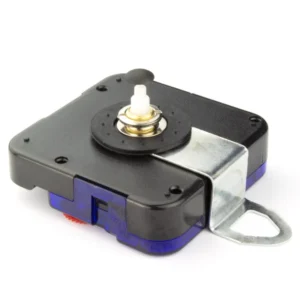
Quartz Clock Movements
Quartz is the most common type of movement in modern battery-powered clocks. A quartz movement uses a battery and electronic timekeeping to drive the hands.
If your clock has stopped, the first things to check are the battery and the hands.
Quartz movements can have different hand movements:
- Step movement: the second hand moves in individual jumps, usually once per second.
- Sweep movement: the second hand appears to move continuously around the dial.
- Silent movement: usually refers to a movement designed to minimise the audible ticking of the second hand. A silent movement may use a smoother hand motion, but “silent” does not by itself identify the underlying type of movement.
A clock described as “quartz” can therefore also be a step, sweep or silent clock.
Radio-Controlled Clock Movements
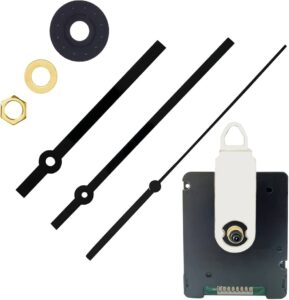
A radio-controlled clock is normally a quartz clock with an additional radio receiver. The clock can receive a time signal and use it to correct its displayed time.
This means the clock may behave differently from an ordinary quartz clock, particularly when setting it or replacing its battery.
Some radio-controlled clocks automatically search for a signal after the battery is installed. The exact procedure varies between designs, so follow the instructions supplied with the clock where available.
Don’t assume the movement is faulty. Signal reception, the clock’s location and the particular movement’s settings can all affect the process.
Mechanical Clock Movements
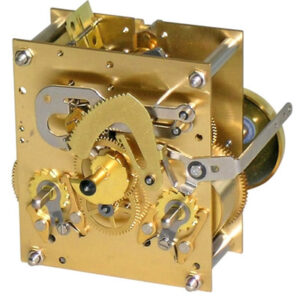
A mechanical movement keeps time using physical components rather than a battery-powered quartz timekeeping circuit.
Mechanical clocks may be powered by a wound spring or, in some designs, weights. They can contain many small moving parts and are generally much less suitable for casual DIY repair than a simple quartz movement.
If a mechanical clock has stopped, first check the obvious operating requirements. A clock may need winding, weights may need to be correctly positioned, or a pendulum may need to be started.
More complicated problems, such as worn parts or problems inside the movement, are usually best left to a clock repairer.
Pendulum Clock Movements
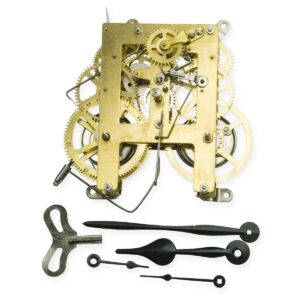
A pendulum is the swinging part you can see on many traditional clocks. It is important to understand that “pendulum” does not always describe a completely separate movement type.
A mechanical clock can use a pendulum as its timekeeping regulator, and some modern battery-powered clock movements can also drive a decorative pendulum.
A pendulum clock therefore needs to be considered according to the movement behind it as well as the pendulum itself.
Step, Sweep & Silent Movements
These terms are mainly useful when describing how the second hand moves and sounds.
Step Movement
A step movement moves the second hand in distinct increments. The familiar ticking sound comes from these individual movements.
Sweep Movement
A sweep movement moves the second hand in a much smoother motion, making it appear to glide around the dial.
Silent Movement
A silent movement is designed to reduce or avoid the noticeable ticking associated with a conventional step movement. The exact construction varies, so don’t assume every silent movement behaves identically.
If you replace a silent movement with a conventional step movement, for example, the new clock may be noticeably louder.
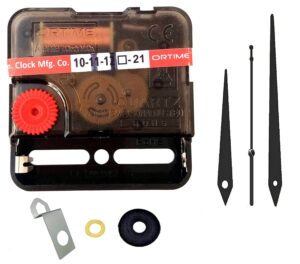
How to Identify Your Clock Movement
You do not normally need to take the movement apart to identify its basic type.
- Look at the back of the clock.
Check for a battery compartment, winding mechanism, weights, pendulum mechanism or radio-control controls. - Watch the second hand.
If there is one, see whether it jumps once per second or moves smoothly. - Listen to the clock.
A conventional step movement will normally produce an audible tick, while a movement designed to be silent should be much quieter. - Look for radio-control buttons or markings.
These may indicate that the clock is designed to receive a time signal. - Check any markings on the movement.
If you can safely access the back of the movement, write down the information shown on it. This can be important when looking for a replacement.
Do not remove the clock movement simply to identify it if doing so requires dismantling the clock.
How to Fix Common Movement Problems
Once you know what type of movement you have, start with the simplest checks.
For a Quartz, Step, Sweep or Silent Movement
- Replace the battery with the correct type. Check the markings in the battery compartment and make sure the battery is fitted in the correct direction.
- Check the battery contacts.
They should make proper contact with the battery. If they are visibly damaged or badly corroded, the problem may need more than a battery change. - Check the hands.
Look from the side of the clock and make sure the hands are not touching each other, the dial, the glass or another part of the clock. - Start the movement if necessary.
Some movements begin running as soon as the battery is fitted; others may have a setting or adjustment procedure. - Set the time using the movement’s adjustment mechanism. Avoid forcing the hands around the dial unless the movement’s instructions specifically allow this.
Do not bend, pull or force clock hands. They are easily damaged, and forcing them can also damage the movement.
If a new battery is fitted correctly but the movement still does not run, replacement is often more practical than attempting to repair the electronic mechanism.
For a Radio-Controlled Movement
- Fit a fresh, suitable battery.
- Allow the clock to begin its normal signal-search process if it has one.
- Put the clock somewhere where it is likely to receive its signal well,
away from obvious sources of electrical interference where practical. - Give it time to complete the signal-search process.
The exact timing and procedure vary between clocks. - If it does not set itself, check the manufacturer’s instructions
before assuming there is a fault.
A radio-controlled clock may also have a manual setting option, but this depends on the particular movement.
For a Pendulum or Mechanical Clock
- Check that the pendulum is correctly attached and hanging freely.
- Make sure the pendulum is not touching the case, weights or other parts of the clock.
- If the clock has weights, check that they are correctly positioned according to the clock’s design.
- Start the pendulum with a gentle, even movement rather than a hard push.
- If the clock repeatedly stops, runs very fast or slow, or appears mechanically damaged, stop adjusting it
and consider professional help.
These mechanisms contain delicate parts, and incorrect adjustments can make the problem worse.
Things to Check & Common Mistakes
Some clock problems are caused by simple installation errors rather than a failed movement.
- The battery may be fitted backwards.
- The battery may be old or unsuitable.
- The hands may be touching one another.
- The minute hand may not be seated correctly.
- A pendulum may not be hanging freely.
- A radio-controlled clock may simply be waiting for a signal.
- A replacement movement may not be compatible with the existing hands, dial or pendulum.
- A movement that is designed to tick may have been fitted when a quiet movement was required.
Don’t assume that any movement will fit any clock. Shaft length, hand fitting, dial thickness, hand type and any additional features can vary between movements.
When Should I Replace the Movement or Get Professional Help?
For a basic battery-powered quartz clock, replacing the complete movement is often more sensible than attempting to repair the electronics inside it.
Replacement becomes particularly worth considering when:
- A fresh, correctly fitted battery does not make the movement run.
- The movement is visibly damaged.
- The hands or movement shaft are damaged.
- The clock loses or gains time despite basic checks.
- The movement makes unusual noises or repeatedly stops.
- You need a replacement movement and cannot identify a compatible type.
For an older mechanical or valuable clock, professional advice is usually the safer option.
A clock that has sentimental, antique or financial value should not be used as a practice project for movement repair.
Video
A useful RepairMyClock.com video could show several clock movements side by side, demonstrating the difference between step, sweep and silent second-hand movements, followed by a simple demonstration of identifying a quartz, radio-controlled and mechanical clock without dismantling them.
Related Guides
This article would make a useful starting point for the following RepairMyClock.com guides:
- How to Replace a Quartz Clock Movement
- How to Fit Clock Hands Correctly
- How to Set a Radio-Controlled Clock
- Why Has My Clock Stopped? Common Causes and Fixes
- How to Set and Start a Pendulum Clock
Frequently Asked Questions
What is the most common type of clock movement?
Quartz is one of the most common movement types in modern battery-powered clocks. It is generally simple to operate and, when faulty, the complete movement can often be replaced.
What is the difference between a step and sweep clock movement?
A step movement moves the second hand in individual jumps, while a sweep movement makes the second hand appear to move smoothly around the dial.
Are silent clock movements really silent?
“Silent” generally means that the movement is designed to minimise the audible ticking. The amount of noise can vary between movements and clocks, so it is better to think of silent as very quiet or low-noise rather than assuming absolute silence.
Is a pendulum movement mechanical?
Not necessarily. Traditional pendulum clocks are often mechanical, but some battery-powered clocks can also have a pendulum, sometimes mainly as a decorative feature.
Should I repair or replace a quartz clock movement?
For many inexpensive battery-powered clocks, replacing a failed quartz movement is more practical than repairing the electronics inside it. However, the replacement must be compatible with the clock’s hands, dial and construction.
